BLOG

Hesam Dadafarin
July 9, 2026

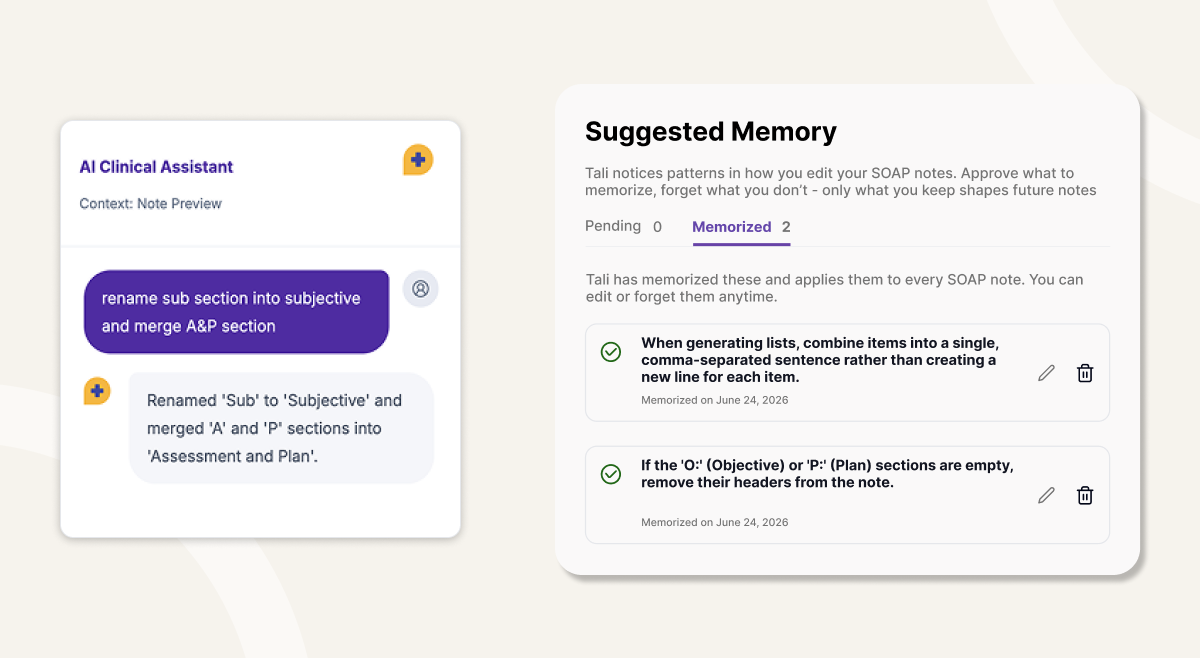
Tali’s new AI engine is now available and can deliver at least 20% higher note quality, helping reduce the edits needed after each encounter.
To get the best results, edit your notes directly in Tali before copying them to your EMR. This helps Adaptive Memory learn from your edits and suggest improvements to your templates or Personal Dictionary.
If you notice unrelated text in a note, check your microphone setup first. Poor audio quality, the wrong microphone input, or a room setup where Tali cannot hear everyone clearly can affect note quality.
Use your Personal Dictionary for drug names, medical terms, names, locations, or phrases Tali regularly needs to recognize.
For note style and formatting, use Tali’s template customization tools. If you need help, our Customer Success team can work with you one-on-one.
We are releasing a new AI engine that can deliver at least 20% higher note quality.
That means Tali-generated notes should start closer to what you need, with fewer edits required before copying them into your EMR.
But even with a stronger AI engine, the best note quality comes from a few simple habits: giving Tali clear audio, editing notes directly in Tali, and personalizing your templates and terminology.
Here are Hesam’s top tips for getting better notes from Tali.
If you want Tali to improve over time, edit your note directly in Tali before copying it into your EMR.
Adaptive Memory looks for patterns in the edits you make. Over time, it can suggest improvements to your templates or Personal Dictionary so future notes start closer to your preferred style.
This is especially helpful if you regularly change the same wording, formatting, section structure, or clinical phrasing.
Tali now includes macros, stamps, and rich text formatting to make in-Tali editing faster and easier. You can clean up your notes, apply common phrases, and format your documentation without leaving your workflow.
The key habit is simple: make the edit in Tali first, then copy the finished note to your EMR.
If Tali cannot hear the full conversation clearly, note quality will suffer.
You do not need a complicated setup, but you do need to make sure Tali can clearly hear both the clinician and the patient. Built-in microphones, poor room setup, background noise, or the wrong microphone input can all affect what Tali receives.
This is especially important if you notice unrelated or unexpected text appearing in a note. Sometimes this is described as a hallucination, but in many cases, the first thing to check is whether Tali heard the encounter clearly.
A few things to check:
Good audio gives Tali better input, which helps produce better notes.
We covered ways to improve this in our Product Webinar.
If you regularly fix the same drug names, medical terms, locations, names, acronyms, or phrases, add them to your Personal Dictionary.
You can find it under:
Settings > Adaptive Memory > Personal Dictionary
Add the term, then record it in three sample sentences using your own voice.
This helps Tali understand how you say the word in real clinical context. Training terms in your own voice can have a major impact when Tali needs to recognize specific terminology that matters in your notes.
This is especially useful for:
If you keep correcting the same word, it probably belongs in your Personal Dictionary.
If your notes are clinically accurate but not formatted the way you like, template customization is the next place to look.
Tali’s AI template customization helps you shape how your notes are structured, what sections appear, and how information is organized.
This is helpful if you prefer:
You can access template customization from the template menu.
If your notes still do not look the way you want after customizing your template, our Customer Success team can help. Book time with them and they can work with you to adjust your setup.
Tali improves when it can learn from real clinician workflows.
That means your edits, your templates, your Personal Dictionary, and your feedback all matter.
Clinicians have told us that Tali Memory can start learning their preferences in as little as 3 days. The more Tali can see how you want your notes to look, the better it can support your documentation style.
You stay in control. Adaptive Memory does not change your setup automatically. It suggests improvements, and you choose what to apply.
If you are seeing not quality issue, take a few moments and check the following:
Small setup changes can make a big difference in note quality.
Have feedback or ideas? Reach out to product@tali.ai. Your feedback helps us keep improving Tali.
Experience the future of healthcare documentation with Tali's AI-powered solutions.
Related Articles

Guides & Resource
March 13, 2026

Guides & Resource
March 10, 2026

Guides & Resource
May 20, 2026

Research
July 9, 2026
6
Research
July 9, 2026
6
Research
July 9, 2026
6