BLOG

Hesam Dadafarin
July 24, 2026

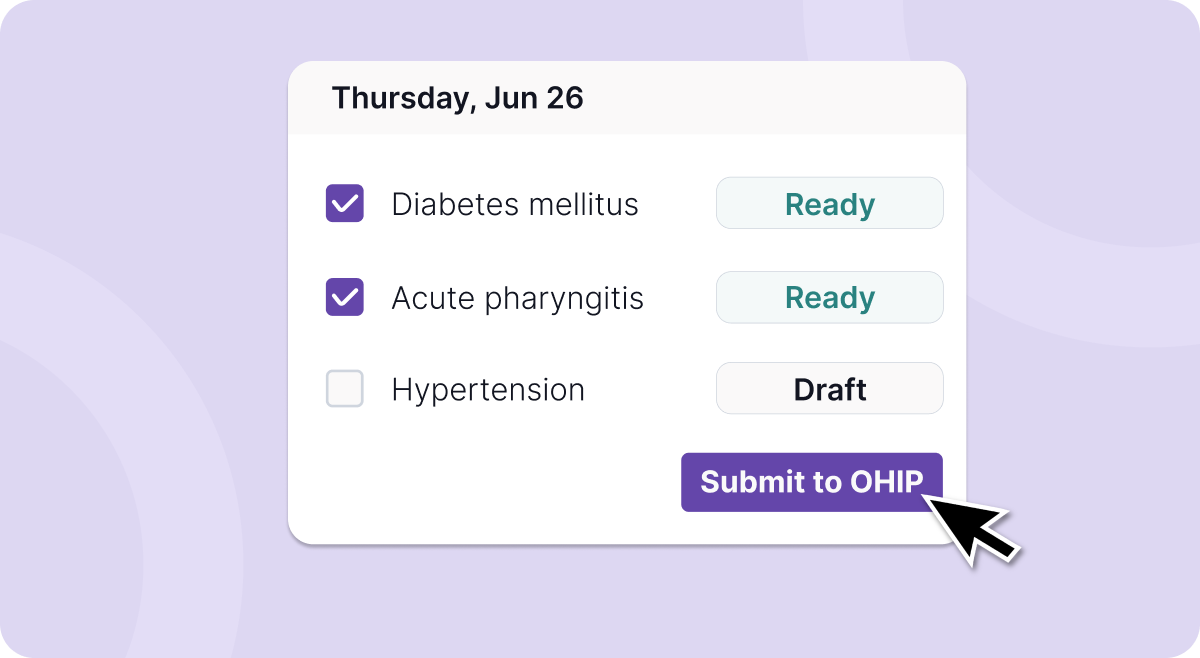
This week’s update is focused on making the work after a patient visit faster, more connected, and easier to manage in Tali.
You can now submit OHIP claims directly in Tali. Claims are created automatically after each encounter, can be reviewed individually or in batches, and submitted through MC EDT.
You can now send notes from custom templates to Med Access in one click. Map your custom template sections once, then send notes to the EMR without manually copying each section.
You can also set a separate default template for phone visits. Every Call a Patient session can now start with the right note format automatically.
We are also adding and updating more forms in Tali, including the Diabetes Visit CDM Flowsheet, CPP Disability Benefits ISP-1151, and Alberta AISH Application Medical Report.
Missed last week’s update? Read it here.
One of the things I like most about these emails is how direct the feedback loop has become.
You tell us what is taking too much time, we look at it with the product team, and when it makes sense, we build it.
This week, I want to thank Dr. Garcia and Dr. Zhao, whose requests helped shape some of what we are releasing today. These are exactly the kinds of workflow details that matter: the extra clicks, the repeated copying, the forms that get finished after hours, and the templates that need to work better for different types of visits.
So today, we are releasing a few updates to help connect what happens during the visit to what needs to happen after it.
Tali now makes it easier to move from patient encounter to OHIP submission in one connected workflow.
For eligible Ontario clinicians, claims can be created automatically after each encounter, reviewed in Tali, and submitted directly through MC EDT.
Instead of moving between disconnected systems, you can keep more of your billing workflow connected to the clinical work that created the claim in the first place.
With OHIP claim submission in Tali, you can:
Create claims automatically after encounters.
Review and approve claims individually.
Review and approve claims in batches.
Submit approved claims directly through MC EDT.
This helps reduce the manual work between finishing a visit and submitting the claim.
You can now send notes from custom templates to Med Access in one click.
If your clinic uses custom templates, you can map your template sections to the appropriate Med Access fields once. After that, notes generated from those custom templates can be sent to the EMR without manually copying and pasting each section.
This is especially helpful for clinicians and clinics that have built templates around their own documentation style, specialty, or visit type.
With custom template Send to EMR for Med Access, you can:
Use your own custom templates in Tali.
Map template sections to Med Access fields once.
Send notes from any mapped custom template to the EMR in one click.
Reduce manual copying between Tali and Med Access.
Your templates can work the way your clinic documents, while still fitting into your EMR workflow.
Phone visits often need a different note format than in-person encounters.
You can now set a separate default template for phone visits, so every Call a Patient session starts with the right format automatically.
That means less manual switching, less editing, and fewer steps before you can start documenting the visit.
With default templates for phone visits, you can:
Choose a template specifically for Call a Patient.
Start phone visits with the right note format automatically.
Keep phone visit documentation consistent.
Avoid switching templates manually each time.
This is a small workflow improvement, but for clinicians who regularly use Call a Patient, it can remove a repeated step from every phone visit.
We are also adding and updating more forms in Tali, so you can keep completing paperwork in minutes instead of after hours.
This week’s form updates include:
Diabetes Visit CDM Flowsheet, Ontario, New
CPP Disability Benefits ISP-1151, 2026, Canada-wide, Updated
Alberta AISH Application Medical Report, 2026, Alberta, Updated
Forms are one of the clearest examples of how clinician feedback shapes what we build.
If there is a form you regularly complete, or one you wish Tali supported, send it to us. We read these requests, we talk about them with the team, and they really do help us decide what to build next.
Find all available forms here.
If you have feedback, feature requests, or ideas, reach out at product@tali.ai. Those conversations genuinely shape what we build next.
Experience the future of healthcare documentation with Tali's AI-powered solutions.
Start Free TrialRelated Articles
Product & Features
July 30, 2026
Product & Features
July 23, 2026

Product & Features
July 1, 2026

Research
July 24, 2026
5
Research
July 24, 2026
5
Research
July 24, 2026
5