BLOG

Tali AI Marketing
July 20, 2026

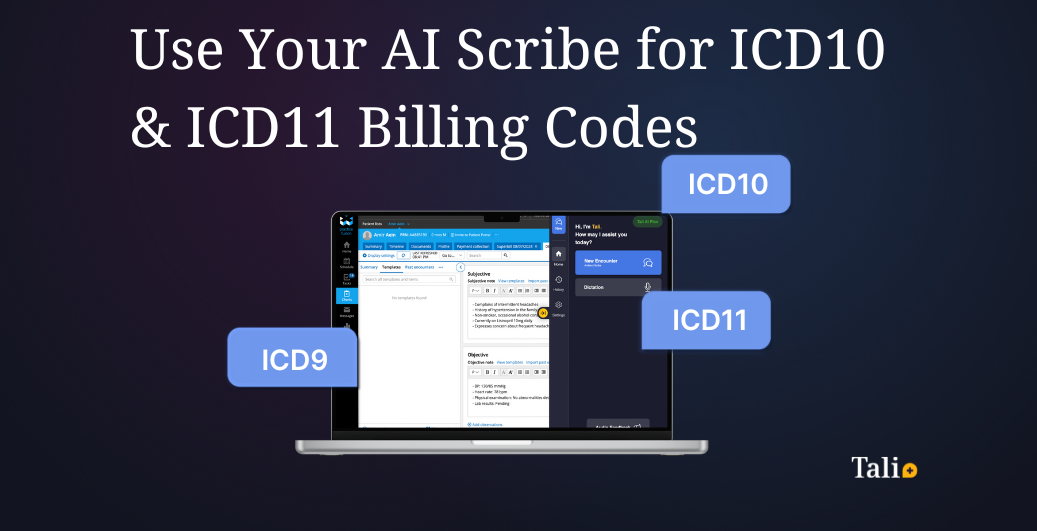
AI scribes generate billing codes by listening to the patient encounter, transcribing it, and mapping the documented diagnoses and procedures to standardized medical billing codes such as ICD-9, ICD-10, and ICD-11. Instead of searching code lists by hand, the clinician gets the relevant ICD codes suggested directly in the note, ready for review. This guide explains what ICD billing codes are, how AI scribe billing codes are generated, and how Tali AI automates the process end to end.
ICD codes are the standardized medical billing codes clinicians use to describe a patient's diagnosis. ICD stands for the International Classification of Diseases, maintained by the World Health Organization, and each code maps a specific condition to a short alphanumeric identifier that payers recognize on a claim.
There are three generations of the code set in use today. ICD-9 is the older system, still referenced in some legacy records, with roughly 13,000 diagnosis codes. ICD-10 is the current standard in most countries and expands to about 70,000 codes, giving far more clinical specificity. ICD-11, the newest revision, is being adopted globally and is fully digital, making it easier to integrate with electronic health records. Accurate ICD codes drive proper reimbursement, support regulatory compliance, and help track patient outcomes over time.
In general, an AI medical scribe captures the visit as ambient audio or dictation and converts it into a structured clinical note. Natural language processing then reads the documented symptoms, diagnoses, and procedures and matches that clinical language to the correct entries in the ICD code set. Because the model understands context, it can distinguish, for example, a diagnosis from a family history mention, and surface the most specific medical billing codes that the documentation supports.
Tali AI brings this to real clinical workflows through its Billing Code Recommender. After you connect the patient and record the encounter, Tali generates the note and, a few seconds later, surfaces recommended diagnostic and billing codes drawn from the visit. In Ontario, you can open an eligibility view that summarizes the relevant rules from the Ministry of Health Schedule of Benefits, add the codes you want to a dedicated Codes section of the note, search for and add any codes manually, and flag anything that looks off so the billing agent keeps improving. The clinician always stays in control: the recommended codes are there to review and confirm, never to submit automatically. To see how automated coding fits into broader billing workflows, compare the leading OHIP billing solutions for Ontario clinics, and learn how Tali works as a multi-platform AI scribe across web, desktop, and mobile.
Providers spend countless hours not only documenting visits but also ensuring that their notes are properly coded for billing. With ICD9, ICD10, and the growing adoption of ICD11, coding accuracy has become more complex and time-consuming.
That’s why Tali AI built its Billing Code Recommender. Once Tali generates your note, it reads the documented diagnoses and procedures and recommends the relevant billing and diagnostic codes for you to review, so you don’t have to search long code lists by hand. In Ontario, the recommender draws on the Ministry of Health Schedule of Benefits and shows the eligibility rules behind each suggested code, and you decide which codes to add to the note before anything is used for a claim.
Accurate coding is more than an administrative task - it’s essential for:
Yet, physicians and clinical staff spend up to 20% of their documentation time searching for and entering codes. This is where AI scribes like Tali make a real impact.
Tali’s AI Scribe listens to the patient encounter and transcribes it in real time. Once the note is ready, the Billing Code Recommender reviews the documented diagnoses and procedures and suggests the billing and diagnostic codes that fit the visit, ready for you to check and add.
How it works in practice:
Instead of clinicians manually searching through drop-downs or code lists, Tali’s AI automatically surfaces the most relevant codes based on the clinical documentation.
What makes Tali unique is its Custom Instructions engine.
This allows you to:
For example, you could set Tali’s instructions to:
If you’d like guidance on setting up billing codes for your clinic, our team can walk you through best practices and configuration. Book a meeting with us to see how Custom Instructions can make coding faster, more accurate, and consistent across your providers.
Tali AI is SOC 2 Type 2 certified and HIPAA compliant, ensuring your patient data is always secure. ICD coding through Tali is designed with compliance in mind, helping providers reduce billing errors while maintaining industry standards.
Need Help Getting Started?
We’re here to help. Book a personalized demo today and see how Tali can save you hours on documentation and billing.
Yes. An AI scribe can suggest billing codes automatically by analyzing the clinical note it generates and matching the documented diagnoses and procedures to the appropriate codes. With Tali's Billing Code Recommender, the relevant codes appear a few seconds after your note is ready, so instead of searching code lists by hand you simply review the suggestions and add the ones you want.
Tali's Billing Code Recommender suggests both billing codes and diagnostic codes based on the visit. In Ontario, the billing codes come from the Ministry of Health Schedule of Benefits, and Tali shows the eligibility rules behind each suggestion. Diagnostic coding follows the ICD system (the international standard behind ICD-9, ICD-10, and ICD-11), and you always review and confirm the codes before they are used on a claim.
Yes. AI-generated codes are meant to assist the clinician, not replace clinical judgment. The suggested medical billing codes should always be reviewed and confirmed by the provider before a claim is submitted, ensuring accuracy and accountability for what is billed.
Yes. Tali AI is SOC 2 Type 2 certified and HIPAA compliant, and ICD coding through Tali is designed with compliance in mind. Patient data is handled securely throughout the process, helping providers reduce billing errors while meeting industry privacy and security standards.
Experience the future of healthcare documentation with Tali's AI-powered solutions.
Start Free TrialRelated Articles
Product & Features
July 30, 2026
Product & Features
July 23, 2026
Product & Features
July 23, 2026

Research
July 20, 2026
4
Research
July 20, 2026
4
Research
July 20, 2026
4