BLOG

Tali AI Product Team
July 23, 2026

For non-salaried primary care physicians in Ontario, billing is often a demanding second job. Managing a practice within a Family Health Organization (FHO) or traditional Fee-For-Service (FFS) framework requires significant administrative effort. Clinicians must track cumulative service limits, check multi-month lookback windows, log precise care minutes, and interpret complicated Remittance Advice reports.
When clinics ask what the best billing solution is, the answer depends entirely on the operational problem they are trying to solve. Most primary care practices are looking for ways to stop revenue leakage and reduce administrative work before a claim is even created. This guide looks at the precise technical and clinical workflows of the top billing options available to Ontario clinics today.
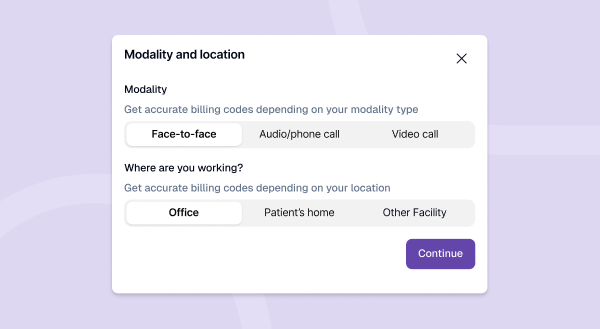
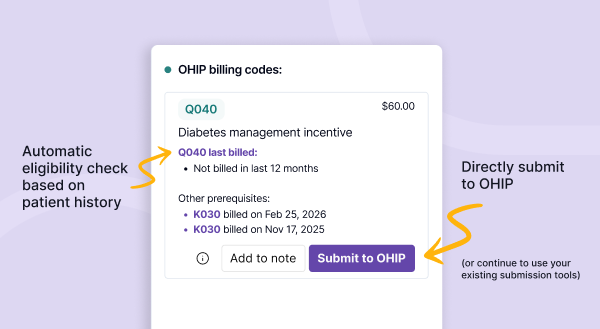
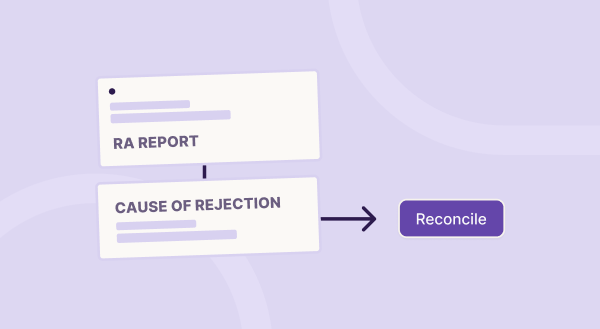
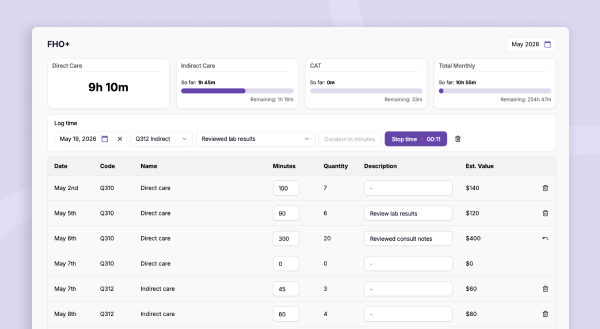
Tali shifts billing support directly to the point of care by operating as an officially approved Realtime Billing Agent. Instead of treating billing as an administrative task to execute hours after a patient leaves, Tali uses ambient clinical context to automate decision-making during the normal documentation workflow.
The operational process is structured around data synchronization and ambient intelligence:
For clinics utilizing market-leading platforms like Accuro or TELUS Health systems, the built-in billing module serves as the infrastructure baseline. Because these modules reside directly within the provincial system of record, they are highly familiar to administrative staff. However, operationally, they function as reactive data-entry utilities.
In Accuro, managing claims requires the user to manually navigate a dedicated Claims and Billing workspace. This workspace divides invoices into distinct operational tabs: Daily Claims, Unsubmitted Claims, Not Reconciled, Remittances, Unmatched Remittances, and Accounts Receivable.
To generate a bill, a user must actively initiate the process by using the Ctrl+B keyboard shortcut or right-clicking a scheduled appointment to launch the Claim Details pane. While Accuro can apply basic billing automation rules (such as pulling the Patient's Last Diagnostic Code or applying a Provider Default Diagnostic Code), these are rigid parameters. If an encounter does not trigger a pre-configured rule, the system automatically defaults the diagnostic code to "0".
Reconciliation is equally manual. When a monthly remittance file arrives, unmatched payments (such as Workplace Safety and Insurance Board or WCB assessments) must be paired with patient claims line by line. If an outstanding balance remains that the clinic accepts, staff must right-click and select "Adjust to Paid" to clear accounts receivable, or manually generate an external C570 form to initiate a formal resubmission.
Within the TELUS Health ecosystem, the billing path depends on the specific platform version in use:
The primary limitation across all built-in EMR modules is the lack of proactive reasoning. The software does not review the text of a clinical note to flag an eligible smoking cessation tracking code, nor does it check patient history to verify if a preventative care premium lookback window is currently open.
DoctorCare does not operate as an in-room application or a real-time code generator. Instead, it is best understood as a managed service and reporting platform designed to optimize overall practice revenue retrospectively.
DoctorCare operates primarily on data extracted after billing events have occurred. Clinics securely share their billing and roster data with DoctorCare’s data analysts.
The service then delivers value through regular administrative reporting and data reconciliation:
DoctorCare is highly effective for macro-level practice health and administrative cleanup, but it does not provide real-time workflow support or automated documentation linking during the patient encounter.
Dr.Bill and ClinicAid are modern, cloud-based applications built to replace traditional, cumbersome claim-entry methods. They specialize in simplifying the mechanics of typing and sending claims.
Dr.Bill is heavily optimized for mobile flexibility. The provider logs into the smartphone application, utilizes the built-in camera to perform a mobile health card scan, and uses an integrated electronic lookup tool to find codes within the OHIP Schedule of Benefits.
Once the user selects the patient and manually enters the desired fee code, Dr.Bill packages the claim and submits it through its integrated MCEDT connection. The platform also features a dedicated premium tier where human billing agents review rejected claims to assist with manual error correction.
ClinicAid offers a clean, web-based software terminal focused on operational claims tracking. Staff log into a centralized cloud dashboard where they can quickly type in billing sheets, perform real-time health card validation checks, and view clear visual statuses (such as paid, pending, or rejected) for every submitted invoice.
While both platforms provide excellent usability and speed up manual data entry, they are entirely user-driven. The software streamlines the technical transmission of data to the Ministry of Health, but the clinician must still remember which codes to apply, track their own FHO+ service minutes manually, and know whether the patient meets complex historical eligibility criteria.
| Workflow Capability |
EMR Built-in Billing (Basic billing needs done manually) |
Tali Billing Agent (Intelligence & advanced automation) |
DoctorCare (Practice optimization service) |
Dr.Bill / ClinicAid (Mobile & claims platforms) |
|---|---|---|---|---|
| Primary Focus | Focuses on manual data entry, processing baseline claims, and maintaining clinical chart proximity. | Focuses on point of care intelligence, proactive code validation, and end to end administrative automation. | Focuses on managed revenue reporting, retroactive bonus optimization, and macro roster health. | Focuses on polished, user driven billing entry and accelerated cloud or mobile claim transmission. |
| Workflow Location | Embedded completely inside the local chart layer of your core system of record. | Embedded within the point of care documentation layer right alongside the AI Scribe. | Positioned external to daily encounters, utilizing retrospective database extraction and consulting. | Operates as a separate cloud environment, accessible via mobile applications or a dedicated web portal. |
| Code Discovery Method | Completely manual processing. Relies entirely on provider memory, manual typing, or basic static macros. | Automated extraction. Generates valid diagnostic and billing codes directly from clinical context using the Realtime Billing Agent. | Retrospective audits. External data analysts review patient charts months after the visits take place. | Manual keyword search. Provides a polished digital lookup tool for the standard provincial schedule of benefits. |
| Patient History Checking | Requires manual review. Admin staff must click through historical entries to check eligibility criteria. | Continuous automatic parsing. Cross references historical data instantly to confirm open lookback windows. | Delayed optimization. Identifies missing annual tracking premiums during retroactive billing cleanup cycles. | No history linking. The provider remains responsible for verifying past code frequencies independently. |
| FHO+ Time Capture | Manual calculation. Clinicians must log indirect care and administrative blocks on external sheets. | Native live tracking. Features integrated session timers directly inside the workspace to capture care minutes. | Aggregated tracking. Analyzes broad scheduling trends after the fact to highlight optimization paths. | Manual input. Providers must calculate and key their own service tracking durations into the software fields. |
| Reconciliation Method | Fragmented tracking. Teams must manually match unmatched payments across separate workspace tabs. | Interactive dashboards. Translates raw remittance advice files into clear explanations and recovery tips. | Full managed service. Professional billing agents handle error corrections and adjustments externally. | Visual status feeds. Displays basic status updates with optional human agent support at premium tiers. |
Selecting an entry path depends entirely on the operational bottlenecks currently impacting your primary care practice:
If you are preparing for FHO+ and want a simpler path that reduces manual work instead of adding more of it, join the waitlist. Tali Billing is being rolled out in stages, and the waitlist is the best way to hear about early access and updates.
Tali connects directly via an official designation within the Ontario Ministry of Health MCEDT portal. This conformance-tested relationship allows the platform to securely import billing histories, establishing the necessary baseline data layer to run automated lookback and eligibility calculations safely.
Yes. Because Tali references your historical patient data, it evaluates frequency-restricted codes (such as specific counseling or preventative care premiums) against the patient's record automatically, warning you if a lookback window is still closed.
Tali is designed to complement your current setup rather than replace it. The platform reads clinical context from your documentation workflow and can sync its validated billing recommendations directly back to your primary EMR environment.
Tali features a built-in workflow timer directly inside the interface. Clinicians can track administrative tasks and indirect patient care minutes easily as they occur, ensuring compliance and accurate reporting under the FHO+ funding model without relying on memory.
Experience the future of healthcare documentation with Tali's AI-powered solutions.
Start Free TrialRelated Articles

Guides & Resource
June 29, 2026
Guides & Resource
July 6, 2026


Research
July 23, 2026
10
Research
July 23, 2026
10
Research
July 23, 2026
10