BLOG

Tali AI Product Team
July 22, 2026

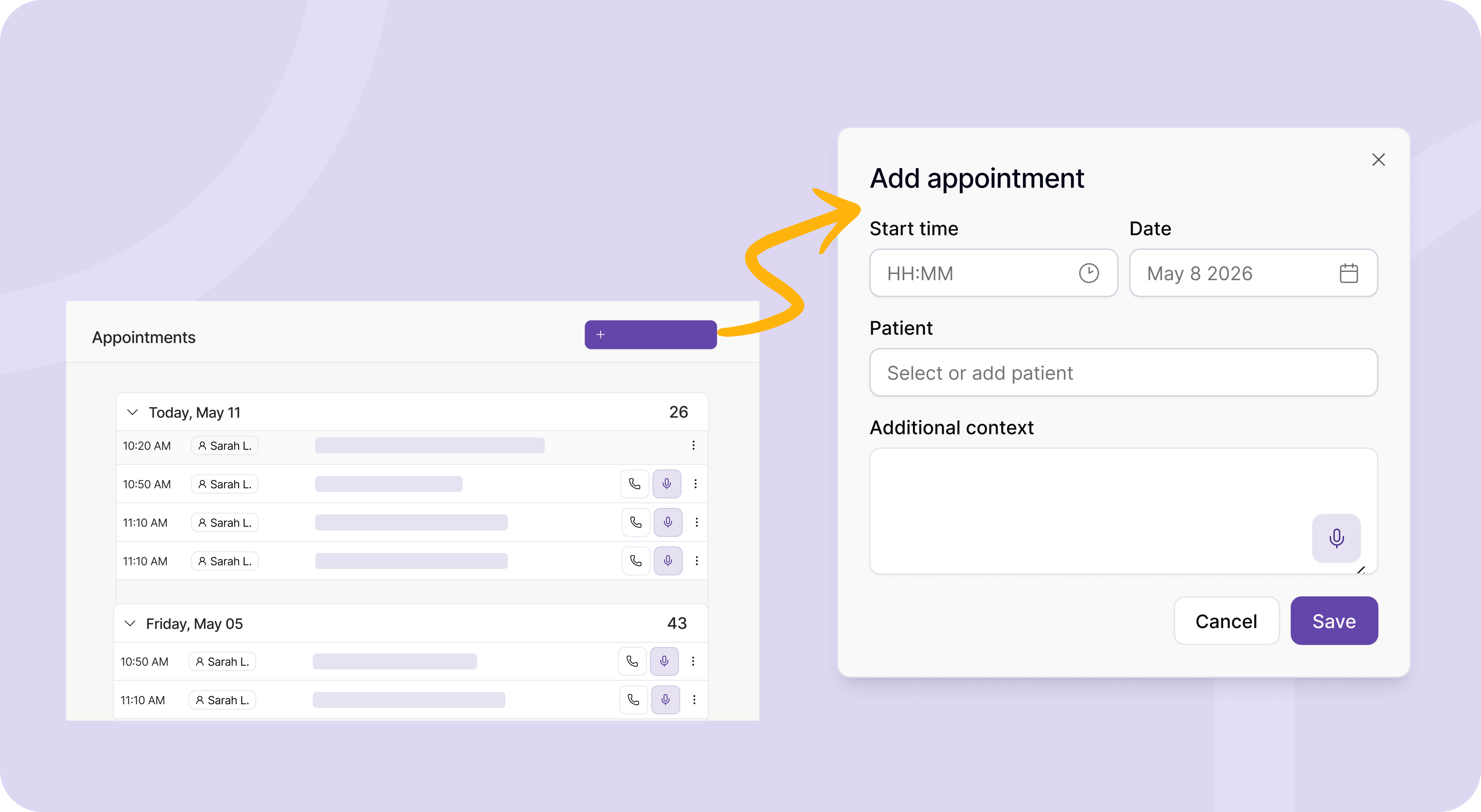
Preparing for a patient visit often requires as much mental effort as the encounter itself. Clinicians spend valuable time reviewing histories and organizing context in disconnected systems, adding to the daily administrative burden.
Tali is Canada’s AI platform for clinics, built to support workflows across the entire clinical day. Because documentation is only one part of providing care, we are introducing Appointments. This new feature unifies your schedule, your clinical context, and your encounter documentation into a single connected workflow.
In a typical clinic, the intelligence gathered before a visit rarely travels seamlessly into the clinical note. When the visit starts, clinicians have to recall or re-enter that context.
Appointments fundamentally changes this dynamic. By bringing your upcoming visits directly into Tali, you can attach relevant prep notes, visit reasons, and patient history to the appointment itself. Giving the AI platform this head start ensures the final generated note is highly accurate, structured correctly, and reflective of the complete clinical picture.
Appointments help you plan ahead by organizing visits and capturing context before the encounter begins.
Read more about Appointments here.
At Tali, we are building the foundation for self-driving clinic operations. In a self-driving clinic, administrative tasks are anticipated and handled by the underlying platform.
Appointments is a critical building block for this future. By moving schedule awareness and pre-visit context into the same platform that handles the encounter, we eliminate friction. This connectivity reduces manual transfer between interfaces, improves data integrity, and recovers capacity across the clinic.
To learn more about optimizing your clinic's workflows and rolling out connected AI solutions, download our guide on Mastering Implementation.
What is Appointments used for?
To organize upcoming visits and add relevant prep notes before the encounter starts.
What details do I need to add when creating an appointment?
The start time and date are required. Adding the patient and context is highly recommended for the best results.
What should I include in additional context?
You can include visit reasons, relevant patient history, reminders, or specific concerns.
Can I start a visit directly from an appointment?
Yes. You can launch an in-person or phone visit directly from the appointment row.
Can I edit or delete an appointment?
Yes. Each appointment can be easily edited or deleted from the main list.
How are appointments organized?
Appointments are grouped by date so you can easily review your daily schedule.
Can I access a past appointment?
Yes. Past appointments remain available in the tab so you can open the encounter page associated with previous visits.
Experience the future of healthcare documentation with Tali's AI-powered solutions.
Start Free TrialRelated Articles
Product & Features
July 30, 2026
Product & Features
July 23, 2026
Product & Features
July 23, 2026

Research
July 22, 2026
4
Research
July 22, 2026
4
Research
July 22, 2026
4