BLOG

Hesam Dadafarin
July 30, 2026

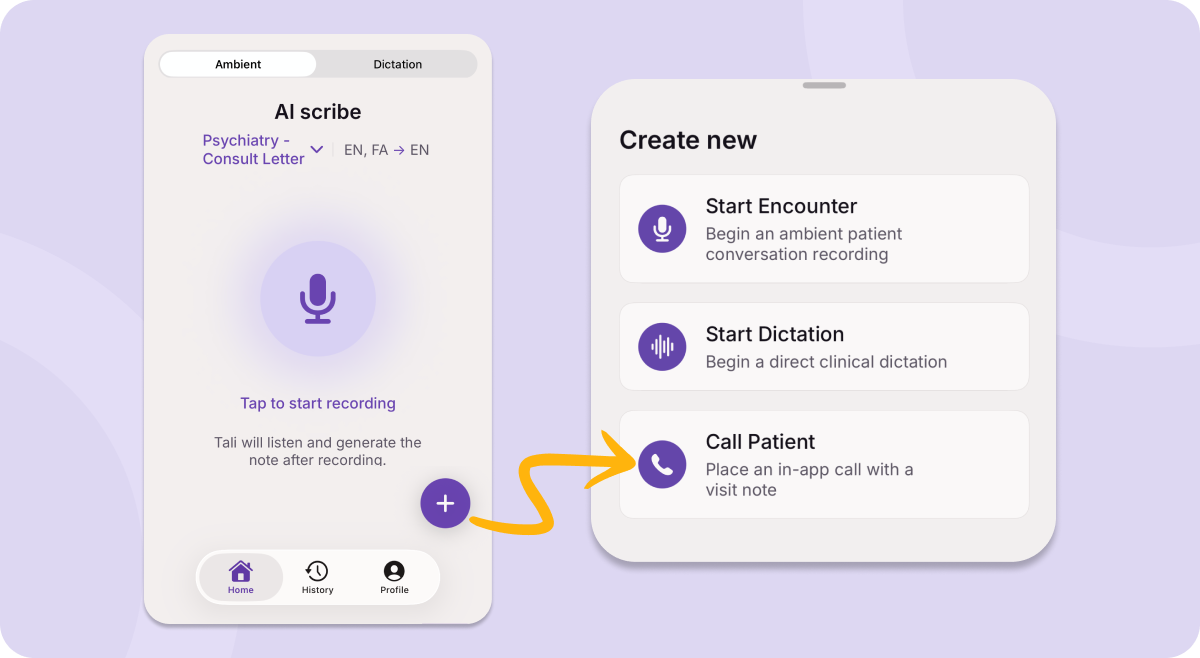
You can now call patients directly from Tali on your iPhone and generate a visit note from the conversation. The updated Tali iOS app makes mobile recording, dictation, and note generation faster and more reliable, with Android support following next week. You can also invite MOAs into Tali to manage appointments, run intake triage, and prepare visits, and select the correct visit type so notes better match how care was delivered.
Missed last week’s update? Read it here.
Many clinicians use Tali’s mobile app to quickly record visits between rooms, document away from their computer, or keep working when a clinic microphone is not available.
This week, we are updating the Tali mobile app on iOS to make that workflow faster and more reliable. The Android update will follow next week.
Whether you are calling a patient from your phone, documenting away from your computer, or relying on your MOA to help prepare the visit, the goal is the same: keep the context connected so the note is easier to create when the work is done.
These updates are designed to make Tali easier to use wherever care happens.
You can now call patients directly from Tali on your iPhone.
Call a Patient on mobile supports phone visits, follow-ups, callbacks, and other patient conversations that happen away from your desk. After the call, Tali can automatically generate a visit note from the conversation, so the documentation stays connected to the care you just provided.
This is especially helpful when a patient interaction happens outside your usual desktop workflow.
With Call a Patient on mobile, you can:
Call patients directly from Tali on your iPhone.
Support phone visits, follow-ups, and callbacks.
Generate a visit note from the conversation.
Document care away from your desk without starting from memory later.
The value is simple: when the conversation happens on your phone, the note can start there too.
We have updated the Tali iOS app to make mobile documentation faster and more reliable.
Many clinicians already use Tali on mobile to record visits between rooms, document when they are away from their computer, or continue working when a clinic microphone is not available. This update is designed to make that mobile workflow feel more dependable.
The updated iOS app brings recording, dictation, and AI-generated notes into one mobile workflow. It also offers better support through connection interruptions, so mobile documentation is easier to manage in real clinic conditions.
With the updated iOS app, you can record visits, dictate clinical thoughts, and generate notes from your iPhone without needing to be at your desk.
Android is coming soon!!
You can now invite MOAs into Tali so your team can manage more of the visit workflow in one place.
MOAs often help with the work that makes an encounter run smoothly: managing appointments, collecting intake context, preparing visit details, and making sure clinicians have the right information before the patient interaction begins.
Now, individual accounts can invite MOAs to support that workflow inside Tali. MOAs can help manage appointments and run intake triage, so clinicians can begin with more of the context they need.
This helps reduce information living in separate places and makes it easier to connect pre-visit preparation to the encounter and note workflow.
For clinics where MOAs already support intake and visit prep, this brings more of that work into Tali instead of leaving it disconnected from documentation.
You can now select the visit type before starting an encounter, so Tali can generate notes that better match how care was delivered.
All encounters are set to In-person by default. Before starting a virtual visit, you can update the visit type so Tali has the right context before generating the note.
Depending on your account, visit type options may include In-person, Phone, Video, or Telehealth.
This is especially helpful for phone, video, and telehealth visits. When no in-person physical exam was completed, the generated note should not include language that sounds like one happened. Selecting the correct visit type helps Tali use more appropriate wording, preserve patient-reported findings, and reduce corrections related to physical exam language.
Your selected template and overall note-generation workflow do not change. For the best results, confirm the visit type before starting the encounter and review the generated note before adding it to the patient chart.
If you have feedback, feature requests, or ideas, reach out at product@tali.ai. Those conversations genuinely shape what we build next.
Experience the future of healthcare documentation with Tali's AI-powered solutions.
Start Free TrialRelated Articles
Product & Features
July 23, 2026
Product & Features
July 23, 2026

Product & Features
July 1, 2026

Research
July 30, 2026
6
Research
July 30, 2026
6
Research
July 30, 2026
6