BLOG

Tali AI Product Team
July 23, 2026

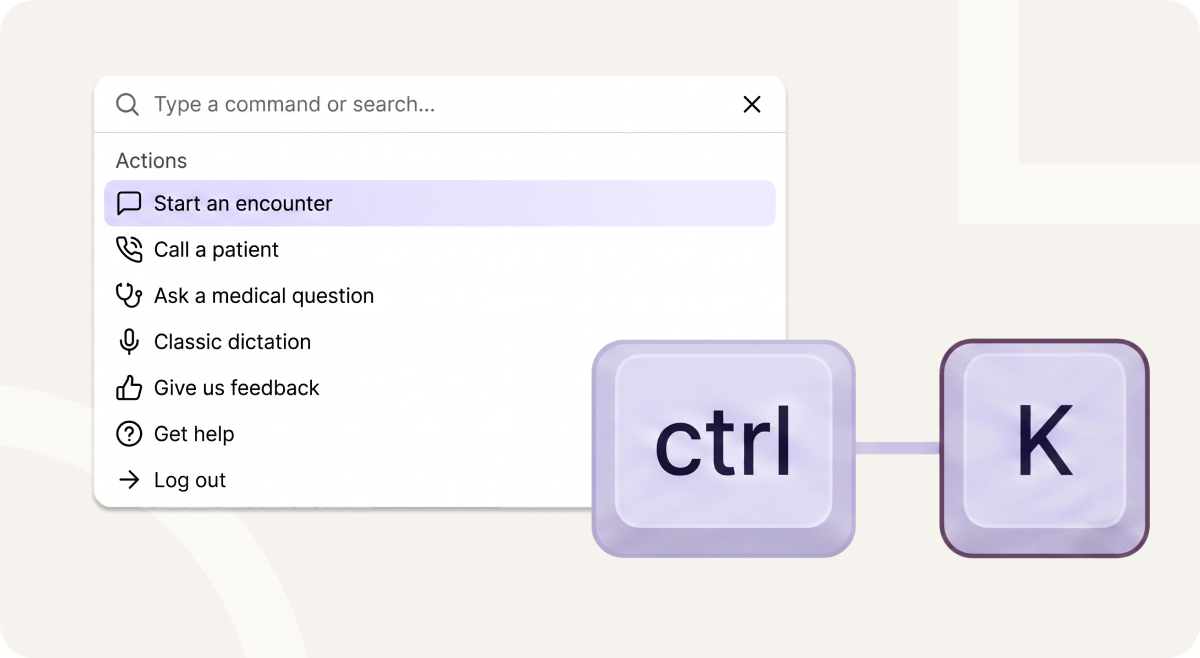
Introducing Tali Command Centre: one central place to move faster through Tali.
Clinicians do not wake up excited to click through menus.
They do not want to search for the right page, remember where a feature lives, or interrupt a patient care workflow because the next action is buried three screens away, they want to move.
Start the encounter. Ask the question. Call the patient. Update the note. Generate the form. Get to billing. Find the template. Keep going.
AI has changed what clinicians expect from software. If the intelligence is instant, the interface should feel instant too. That is why we built Tali Command Centre.
Zero clicks. Total control.
Command Centre gives clinicians one universal shortcut for the actions they use most in Tali.
Press Ctrl+K, or Command+K on Mac, to open Command Centre from anywhere in Tali. From there, you can search, navigate, and take action across Tali from one place without hunting through menus. It is not another shortcut to memorize, it's one quickkey to search, navigate, and take action across Tali.
Command Centre is available now on the web and desktop apps, and will be released soon for Chrome Extension and SDK.
Healthcare software has trained clinicians to tolerate friction.
Want to start a workflow? Click through navigation.
Want to find a setting? Open a menu.
Want to edit a note? Find the right button.
Want to ask a question? Leave the page.
Want to go back to an encounter? Search through history.
Each click is small. But across a full clinic day, the friction adds up.
It slows clinicians down. It breaks focus. It makes powerful features feel harder to reach than they should.
In an AI-powered product, that mismatch feels even more obvious.
If Tali can help generate notes, answer medical questions, suggest billing opportunities, and update documentation, then the way clinicians access those capabilities should be just as fast.
Command Centre is our answer.
Command Centre is a new interaction layer for Tali.
Instead of organizing every workflow behind menus and pages, Command Centre brings the most important actions into one fast, searchable experience.
Clinicians can open it from anywhere, type what they need, and act.
Start an encounter.
Call a patient.
Ask a medical question.
Open a template.
Jump to billing.
Navigate to settings.
Return to a recent encounter.
Inside an encounter, Command Centre becomes even more powerful. Clinicians can generate a form, add context, customize the template, or type an edit instruction and let Smart Edit update the note.
The result is simple: less clicking, less searching, less context switching.
More flow.
The best shortcut is the one that knows what you are trying to do.
Command Centre changes based on where the clinician is in Tali. From the broader app, it helps with global actions like starting encounters, calling patients, asking medical questions, navigating to pages, and opening recent encounters.
Inside an encounter, it surfaces encounter-specific actions. That means clinicians do not need to remember every feature location or every possible shortcut. They just press Ctrl+K, or Command+K on Mac, and type what they want to do next.
From anywhere in Tali, clinicians can use Command Centre to:
Start a new encounter
Call a patient by entering a phone number
Ask Tali’s medical search agent a question
Navigate to key pages like History, Templates, Billing, Reconciliation, Settings, and more
Open recent encounters
Find relevant actions based on where they are in the app
Inside an encounter, clinicians can use Command Centre to:
Generate a form
Add context
Customize the template
Type an edit instruction and update the note with Smart Edit
Command Centre is designed to make everyday actions faster, easier to discover, and easier to repeat.
For years, clinical software has made users adapt to the product.
Learn the menu. Learn the workflow. Learn the shortcut. Learn where everything lives.
Command Centre flips that model.
The clinician should not have to think, “Where is this feature?”
They should be able to think, “What do I want to do next?”
Then do it.
That is the shift.
Command Centre is not just a faster way to navigate Tali. It is a faster way to work with Tali.
Tali is becoming more capable across more parts of the clinical workflow: documentation, medical search, forms, calling, billing, note editing, and more.
Command Centre gives those capabilities a common front door.
As Tali gets more powerful, clinicians should not need more buttons, more menus, or more training to keep up.
They need one place to command the work.
That is Command Centre.
Zero clicks. Total control.
Press Ctrl+K, or Command+K on Mac, to open Command Centre and see how fast your workflow can feel.
Experience the future of healthcare documentation with Tali's AI-powered solutions.
Start Free TrialRelated Articles
Product & Features
July 30, 2026
Product & Features
July 23, 2026
Product & Features
July 23, 2026

Research
July 23, 2026
3
Research
July 23, 2026
3
Research
July 23, 2026
3