BLOG

Tali AI Product Team
July 22, 2026

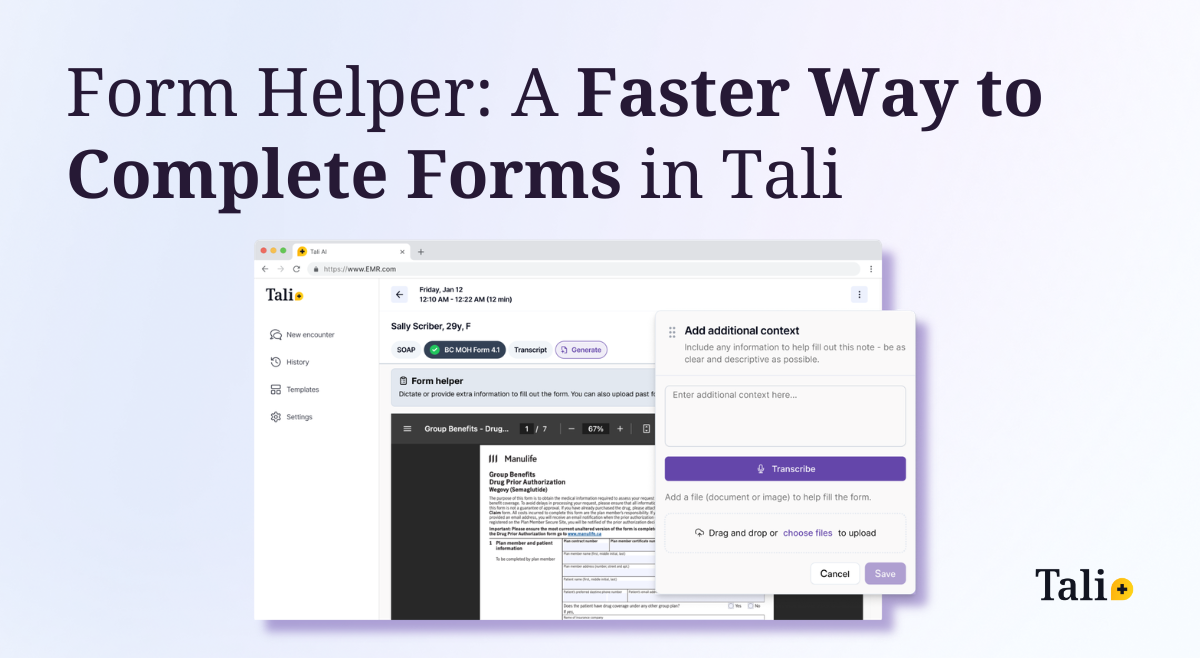
Structured forms are one of the most time-consuming and repetitive parts of clinical documentation. Whether it’s medical disability paperwork, insurance forms, or government documentation, clinicians often find themselves re-entering the same information across multiple sections.
Tali already helps streamline this process. After an encounter, you can generate structured documentation from your patient conversation. Alongside your SOAP note, Tali uses the transcript to populate one of our available fillable forms, helping reduce manual entry and save time.
You can explore the full list of supported forms in our previous guide to Tali forms.
But we know something important. Not everything needed for a form comes up during the appointment itself. Sometimes additional context is required. Sometimes details need clarification. Sometimes you need to reference past documentation.
That’s why we built Form Helper.
Form Helper is a floating input tool that allows you to add additional context to a form after it has been generated.
If certain fields are incomplete or require clarification, you can simply:
Tali uses that added information to further populate the form intelligently.
Instead of manually editing multiple fields one by one, you provide the information once. Tali does the rest.
Form Helper gives you flexibility when documentation needs extend beyond the initial conversation.
You can securely upload:
Tali uses this additional context to assist in completing the form more efficiently, reducing repetitive manual work.
Form Helper is available on both the Tali Web App and Desktop App.
Form Helper is designed to support documentation, not replace clinical judgment. As with all AI-generated content, clinicians should carefully review forms for accuracy and completeness before submitting them.
Using Form Helper starts with generating a form from an encounter.
If your form is missing information, you can either manually edit fields or use Form Helper to dictate additional context and upload supporting files.
Once complete, you can download or print the form directly from Tali.
Forms are rarely straightforward. Requirements vary, details are nuanced, and documentation standards are high.Form Helper was built to support the way clinicians actually work:
The goal is simple: make structured documentation more efficient while keeping clinicians in control. If you are already using Tali for encounter documentation, Form Helper extends that efficiency to form completion as well.
Experience the future of healthcare documentation with Tali's AI-powered solutions.
Start Free TrialRelated Articles
Product & Features
July 30, 2026
Product & Features
July 23, 2026
Product & Features
July 23, 2026

Research
July 22, 2026
4
Research
July 22, 2026
4
Research
July 22, 2026
4