BLOG

Tali AI Product Team
July 26, 2026

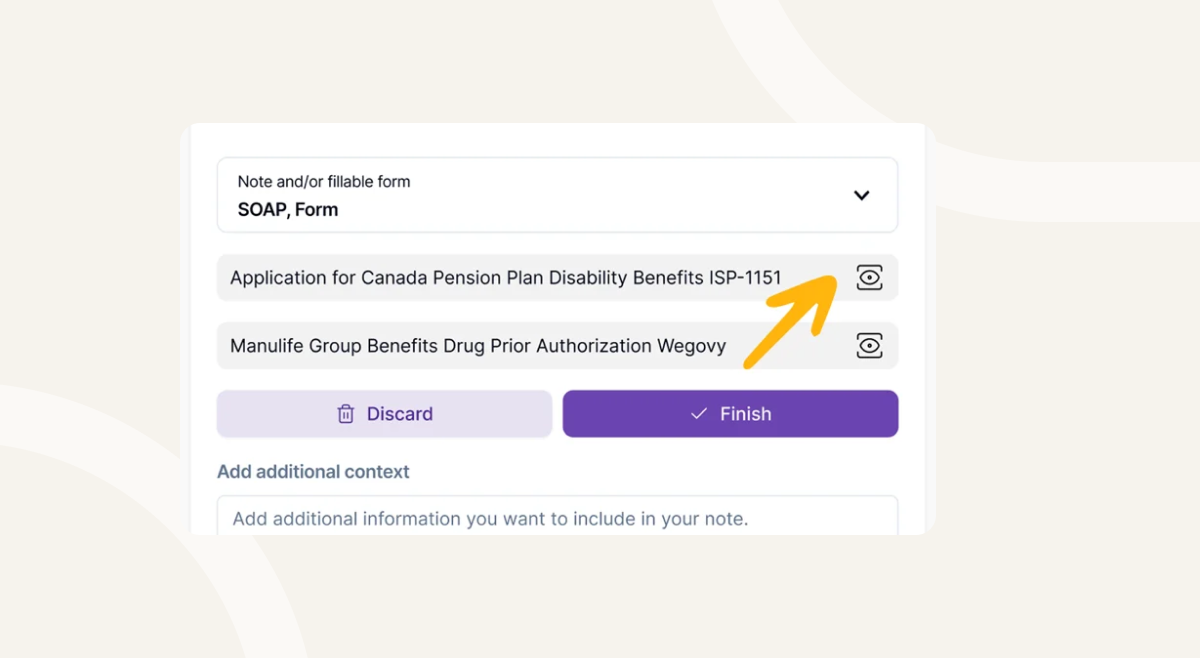
Form Preview lets you review forms while an encounter is still in progress, helping you capture the right information while it’s easiest to confirm.
With Form Preview, you can:
Completing forms after a visit often means going back through notes, charts, and patient details to find missing information.
Form Preview helps bring that process into the encounter itself.
Instead of trying to remember what a form requires afterward, you can review the form while the visit is still happening and capture the information as it comes up naturally in conversation.
The result is a smoother workflow, more complete documentation, and less manual review after the encounter.
Form Preview helps you:
Begin recording your encounter as usual.
During the encounter, open the Templates and Forms dropdown.
Go to the Forms tab and choose the form you want Tali to complete.
You can select insurance forms, referral forms, assessment forms, and other supported clinical documentation. You can also select more than one form during the encounter.
Open the selected form while the encounter is still recording to review the sections and information it requires. This makes it easier to confirm important details during the conversation instead of reviewing charts and notes afterward.
As you review the form, mention any relevant information that should be included, such as symptoms, medications, relevant history, dates, functional impacts, or supporting clinical details.
Because the encounter is still recording, Tali can use this information later when generating the completed form.
When you select Finish, Tali uses the encounter transcript to help generate the completed form.
Forms are often one of the most time-consuming parts of clinical documentation.
The challenge is rarely filling out the form itself, it’s remembering all the information needed after the visit is already over.
Form Preview helps bring that work into the same workflow as the encounter, reducing rework and helping clinicians capture information while it is still top of mind.
The result:
No. Form Preview allows you to review the form during the encounter. The form is generated after the encounter is finished.
Yes. You can open and review forms while the encounter continues recording.
Yes. You can select multiple forms from the Forms tab during an encounter.
If details are not captured during the encounter, some fields may need to be reviewed or completed manually afterward.
You can preview supported clinical forms such as referral forms, insurance documentation, assessments, and other workflow-related forms.
Experience the future of healthcare documentation with Tali's AI-powered solutions.
Start Free TrialRelated Articles
Product & Features
July 30, 2026
Product & Features
July 23, 2026
Product & Features
July 23, 2026

Research
July 26, 2026
5
Research
July 26, 2026
5
Research
July 26, 2026
5